AlphaOracle —— Learn from the past to understand the present, and explore the secrets of the millennia-old cultural context.
An exploration guide crafted for oracle bone script researchers and enthusiasts, connecting cutting-edge wisdom from ancient and modern times.
 HuggingFace
✨ System Vision
「AlphaOracle」It is not only a portable tool for exploring the secrets of oracle bone script, but also a professional open platform for oracle bone script that integrates numerous cutting-edge AI algorithms and a vast amount of authoritative ancient texts. This system is committed to streamlining and intelligentizing the cumbersome process of oracle bone script research, assisting you in quickly searching for more interpretative clues, whether for inscriptions or individual characters.
Core Features:
- Rubbing Detection and Interpretation: Automatically recognizes sentences and characters on oracle bone rubbings, providing reading order and modern Chinese transcription.
- Multi-Path Single-Character Analysis: Identifies deciphered characters and, based on form, evolution, and semantics, generates multiple candidate results for undeciphered characters.
- Visualized Evolution Path: Displays the evolutionary process of candidate results from oracle bone script to seal script through a timeline, aiding the understanding of character form changes.
- Oracle Bone Sentence Translation: Supports translation of oracle bone inscriptions into modern Chinese, helping users better understand the original meaning of rubbings.
- Single-Character Retrieval and Analysis: Enables one-click retrieval from a large corpus of rubbings and manuscripts to trace the sources and usages of similar character forms.
- Single-Character Literature Retrieval: Intelligently retrieves academic research materials related to oracle bone characters, revealing their usage across different studies.
‼️ATTENTION‼️
To continuously enhance the user experience, this system is still under development and iteration. Some functions may be unstable or temporarily unavailable. When you encounter an issue, you can first try again later. If the problem persists, please send the specific details (operation steps, screenshots, etc.) to ylliu@hust.edu.cn, and we will handle it as soon as possible. Thank you for your patience and understanding!
🖥️ Workspace Overview
A concise yet powerful research interface for oracle bone script
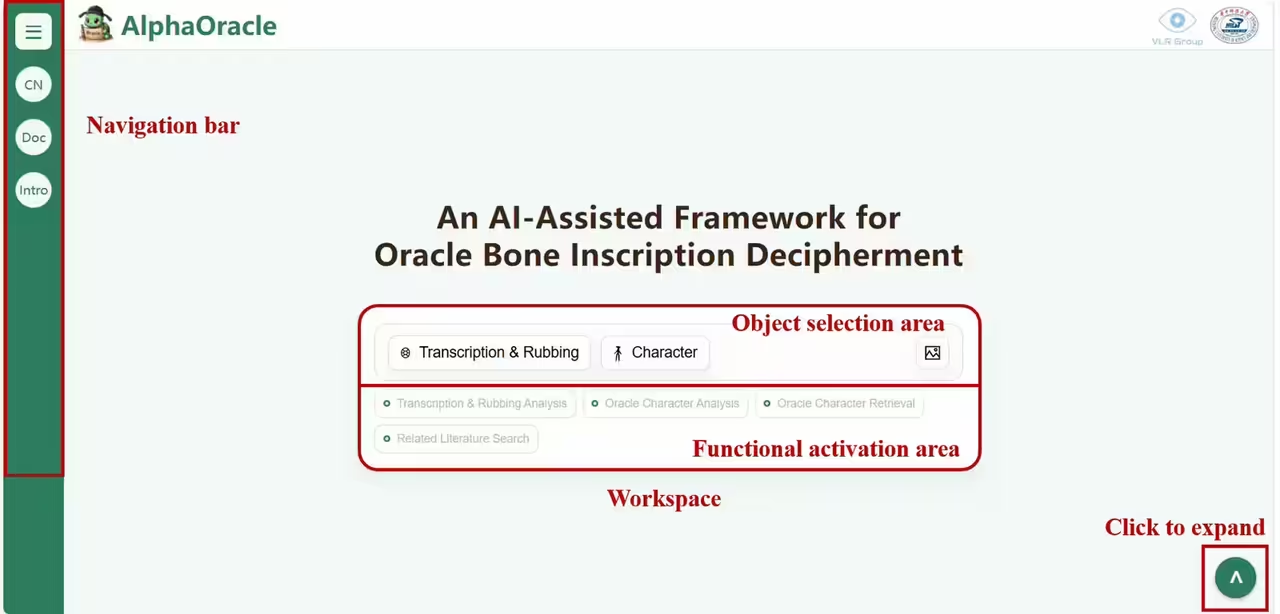
“AlphaOracle” Main Interface Illustration
Click the bottom-right arrow or the buttons in the Object Selection Area to expand the Information Panel:
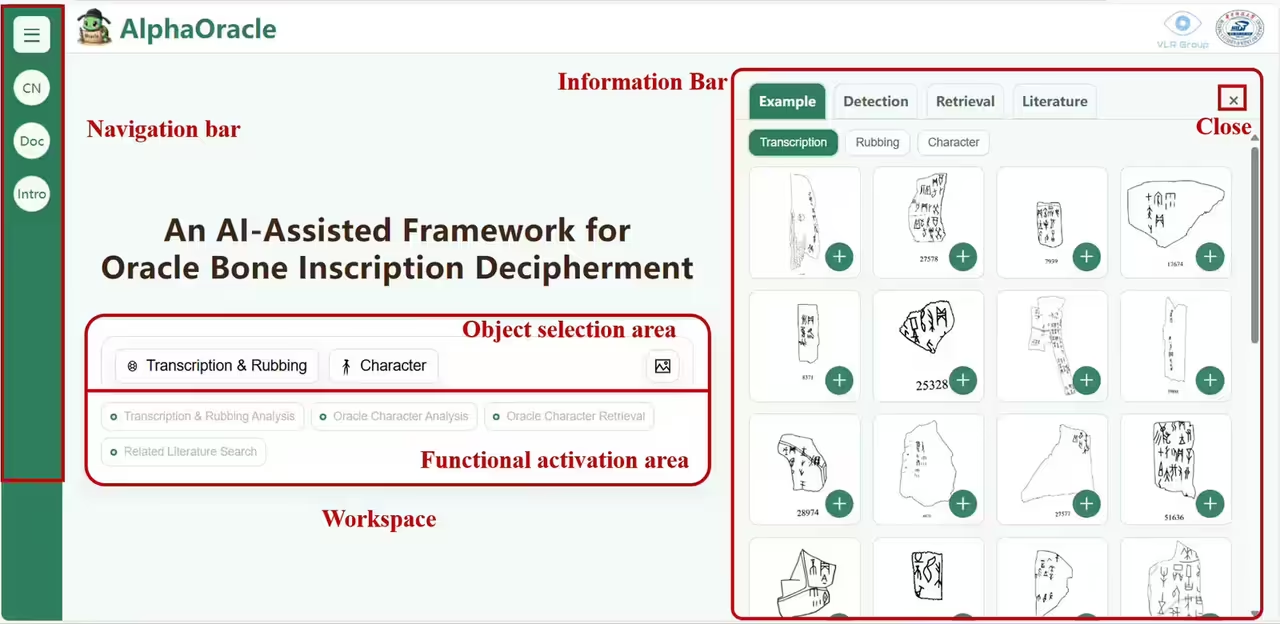
“AlphaOracle” Expanded Interface Illustration
“AlphaOracle” supports the input of photocopied rubbings, transcription, photocopied single characters, and manuscript single characters, enabling multi-dimensional oracle bone analysis with comprehensive functionality:
- Navigation Bar: Switch between Chinese and English interfaces, view system references, and access documentation
- EN: Switch the main interface to English.
- Doc: View the list of all references used in the system.
- Intro: Access the system manual.
-
Workbench: This is the core area for oracle bone analysis. All operations, whether on rubbings or single characters, start here.
- Select Oracle Bone Fragment: Choose from various manuscript rubbings and photocopied rubbings provided by the system.
- Select Oracle Bone Character: Choose from multiple single-character samples provided by the system.
- Image Upload: Upload oracle bone rubbings or single characters from your own device.
- Transcription & Rubbing Analysis: Activated when a rubbing is uploaded. Supports detection and recognition of oracle bone inscriptions and characters within the rubbing, and provides translations for each inscription.
- Oracle Character Analysis: Activated when a single character is uploaded or selected from a rubbing. Supports detailed analysis of the character’s decipherment, including its form, evolution, radical, meaning, similar forms, and an evolutionary timeline.
- Oracle Character Retrieval: Activated when a single character is uploaded or selected from a rubbing. Retrieves the original rubbing source of the character based on the analysis results, helping you quickly locate the character.
- Related Literature Search: Activated when a single character is uploaded or selected from a rubbing. Intelligently searches for relevant academic literature that discusses the usage of the character.
▶ Object Selection Area: Supports selecting analysis materials from the system’s built-in examples or from images uploaded locally.▶ Function Activation Area: Activates relevant functions based on your selections and uploaded results. - Information Panel: Displays system results and comprehensive oracle bone research materials.
- Example: Shows prepared manuscript rubbings, photocopied rubbings, and single-character images. Click an image to enlarge for detailed viewing, or click “➕” to upload automatically.
- Detection: Displays specific results from rubbing analysis, including annotation boxes for inscriptions and single characters. Click on a character for detailed analysis.
- Retrieval: Shows related rubbings indexed by oracle bone characters. Each rubbing contains similar character forms to the uploaded oracle bone character.
- Literature: Displays academic references related to the analyzed oracle bone characters, providing insights into different usages and research materials.
🧭 User Guide
It only takes two steps to quickly learn how to use this system for oracle bone inscription research:
Step 1: Select your research object
Load the oracle bone materials you want to analyze (rubbings, individual characters)
Input two types of oracle bone materials in multiple ways:
Format 1: Upload the Transcription & Rubbing
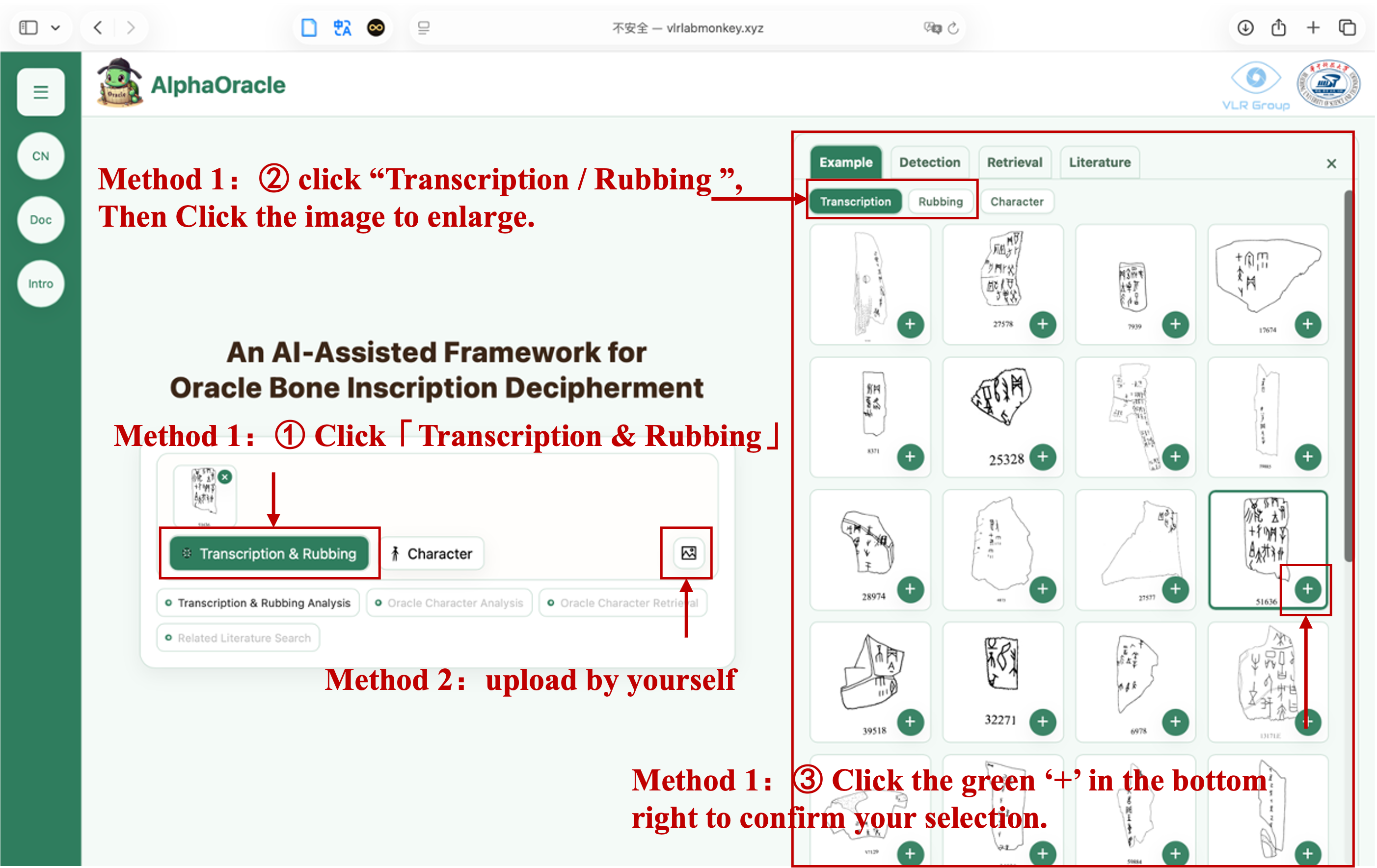
2 Method to Upload Transcription & Rubbings
- Using the system-provided transcription / rubbing copies:
- Click “Select Oracle Bone Fragment” in the center of the homepage.
- In the pop-up gallery, freely choose from the high-resolution Transcription or Rubbing provided by the system.
- Click the green “+” icon in the lower-right corner to load the selected item into the workspace.
- Local upload:
- Click the Image Upload button on the right-hand side to import files from your device.
Format 2: Upload Oracle Bone Character
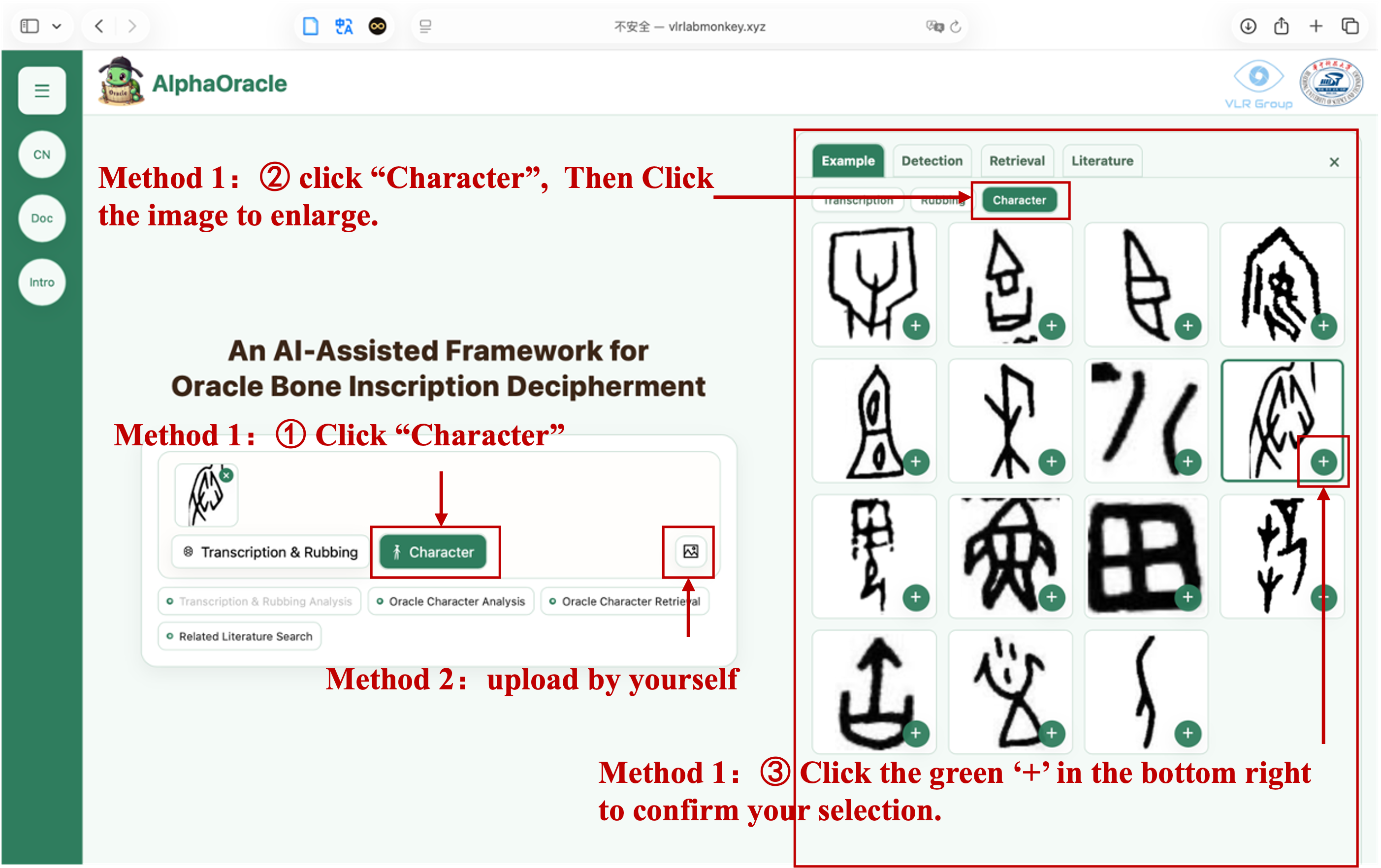
2 Method to Upload Oracle Bone Character
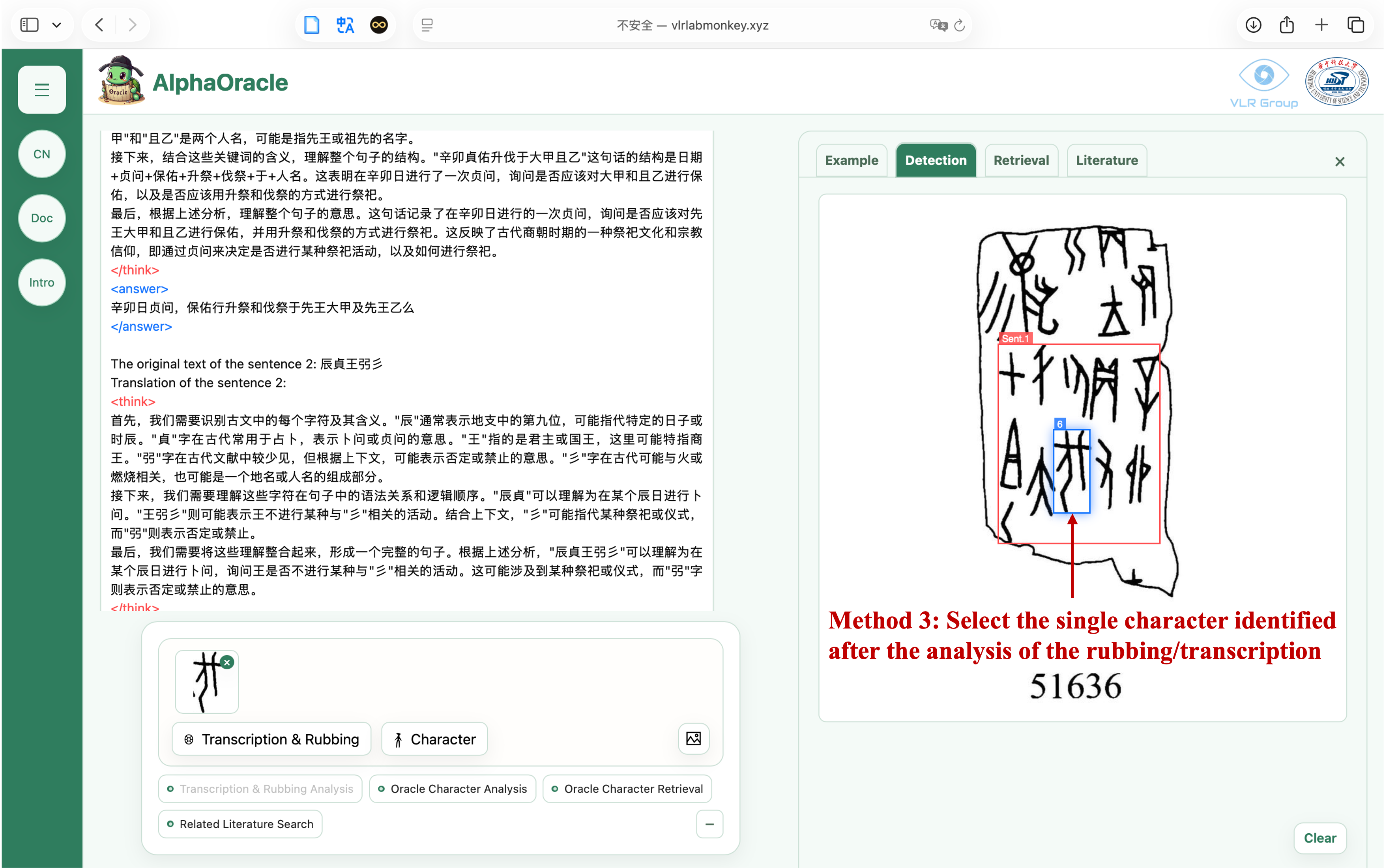
Method 3: Click on the single character in the rubbing analysis results
- Using the system-provided single characters:
- Click “Select Oracle Bone Character” in the center of the homepage.
- In the pop-up gallery, freely choose from the high-resolution single character samples provided by the system.
- Click the green “+” icon in the lower-right corner to load the selected item into the workspace.
- Local upload:
- Click the Image Upload button on the right-hand side to import files from your device.
- Select single characters displayed after uploading a rubbing for analysis:
Tips:
- To ensure the best analysis results, it is recommended to upload high-resolution images with no obstructions in the oracle bone text area.
- During the file upload process, the system will automatically detect the file content. You can click the button to highlight it, while other buttons will be grayed out.
- To avoid resource occupation, it is strictly forbidden to upload irrelevant images. If the system detects multiple uploads of irrelevant files, it will 「ban IP access」.
1 Rubbing/Impression Analysis
Automatically detect and analyze the oracle bone text and individual characters on the rubbing or impression, and provide complete sentence translations.
Load the oracle bone rubbing or impression, and click the 「Rubbing/Impression Analysis」 button:
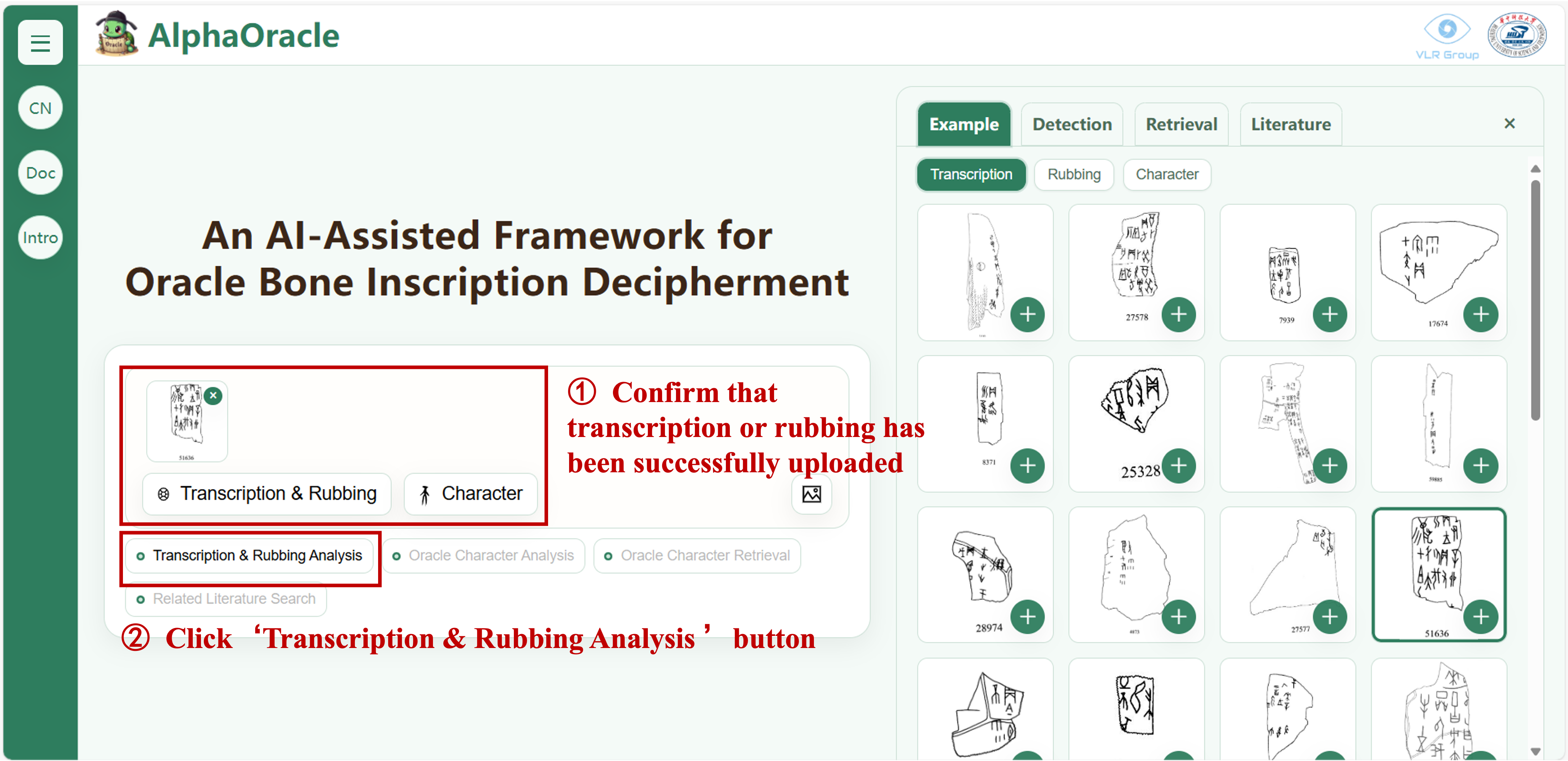
Upload the rubbing and conduct rubbing analysis
After a while, the system will provide the rubbing analysis results:
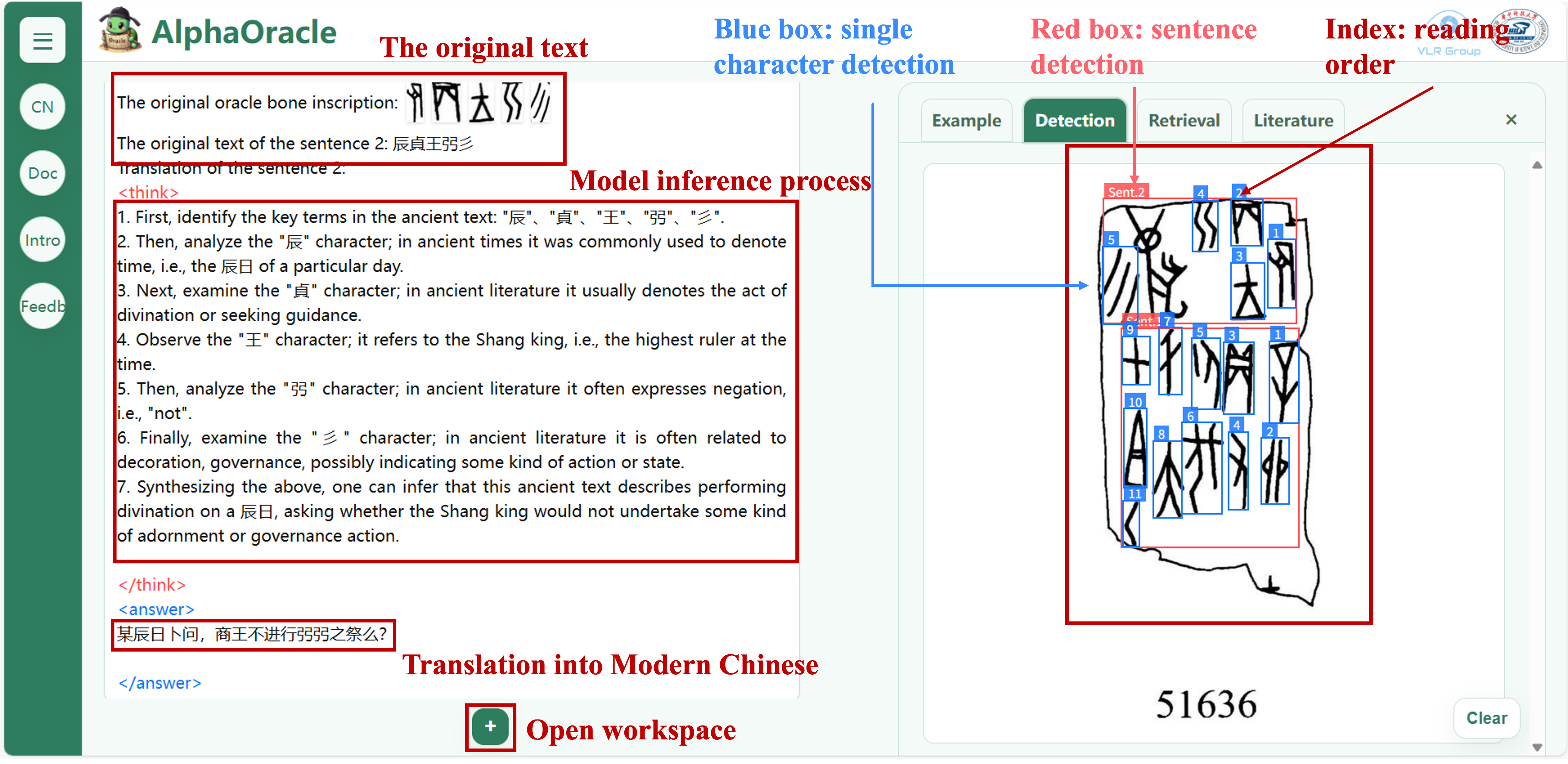
Rubbing result analysis diagram
- AI Automatic AnnotationL:The system will complete the rubbing analysis within a few seconds.
- 🔵 Blue Box:Precisely locate each independent oracle bone character.
- 🔴 Red Box:Intelligently identify sentence segments that form complete semantics.
- 🔢 Serial Number:Sort according to the correct reading order of the divination text.
- Results Synchronization:The left information bar will instantly generate an interactive analysis report.
- Original Text and Translation:Display the oracle bone text sequence and its corresponding modern Chinese interpretation sentence by sentence.
- Thinking Chain Display:If you are interested in the AI's decision-making process, you can read the content of the
<think>tag to explore its "thoughts".
Click “+” to expand the workspace:
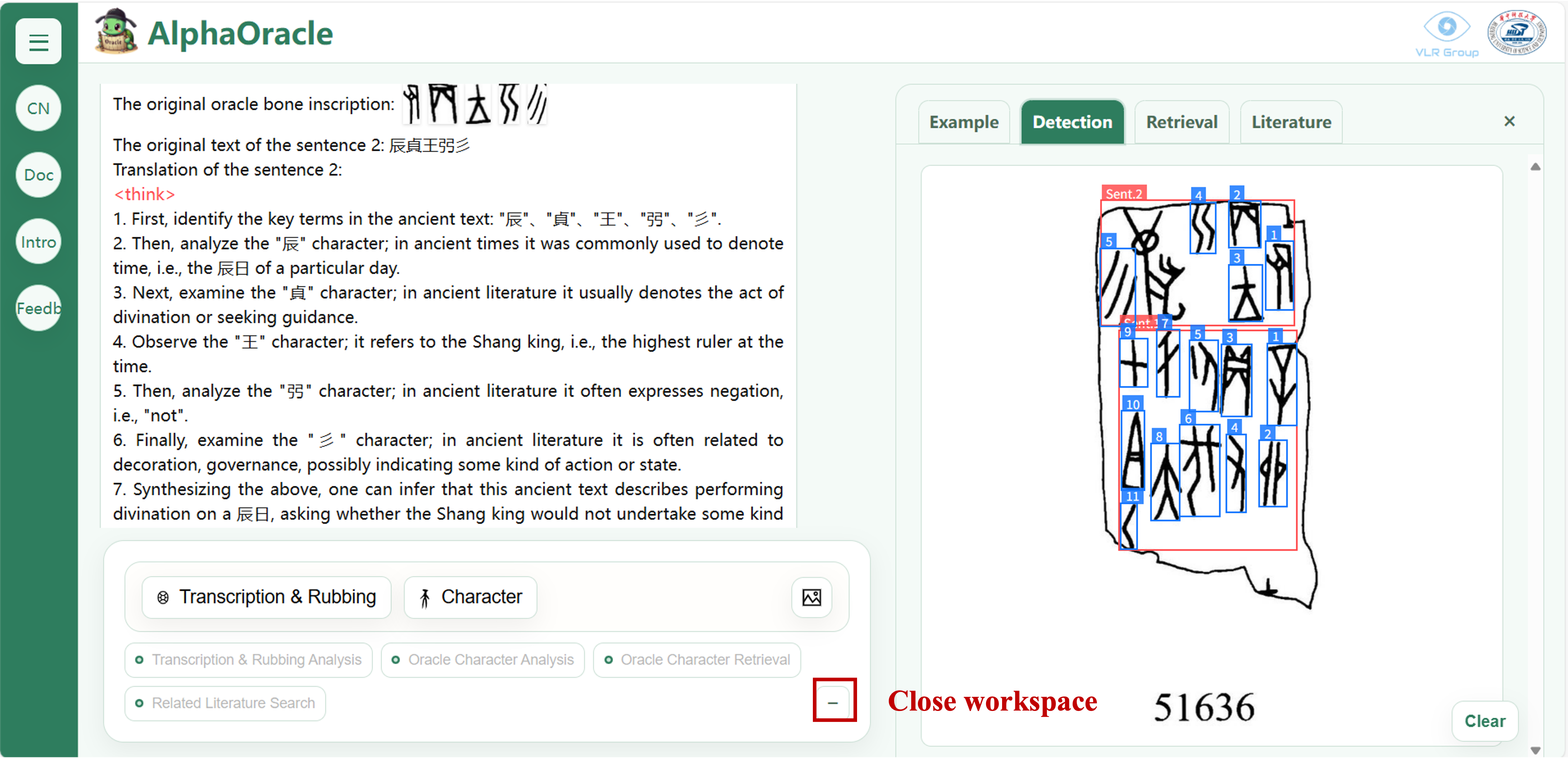
Expand the workspace to proceed with the next step.
2 Oracle Bone Single-Character Analysis
Automatically detect and analyze single characters in oracle bone inscriptions, providing detailed interpretations.
Upload or click on a single character within the blue box of the analyzed rubbing, then click the “Single Character Analysis” button:
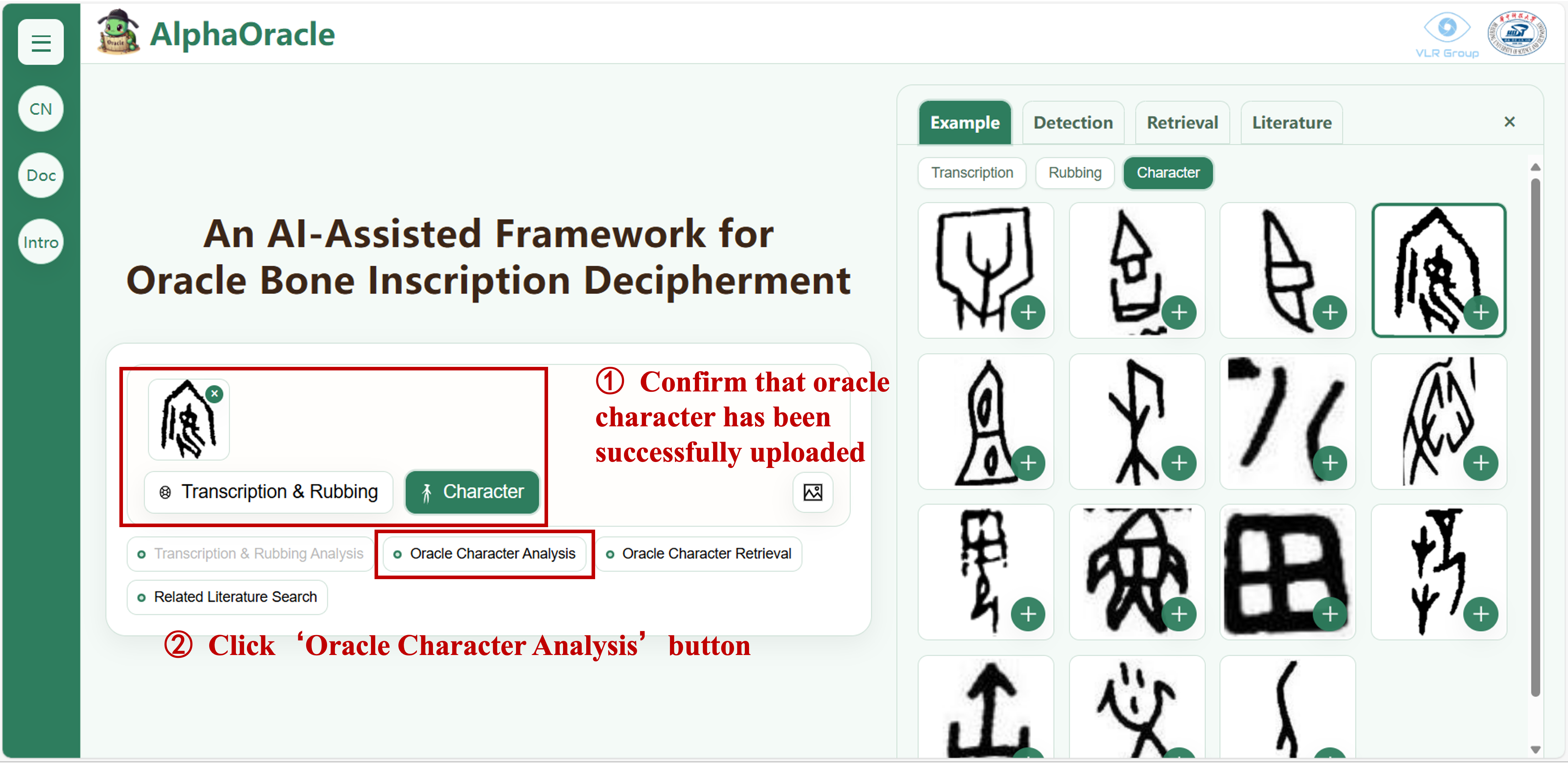
Upload a single character and perform oracle bone single-character analysis
After a short wait, the system will provide the single-character analysis results:
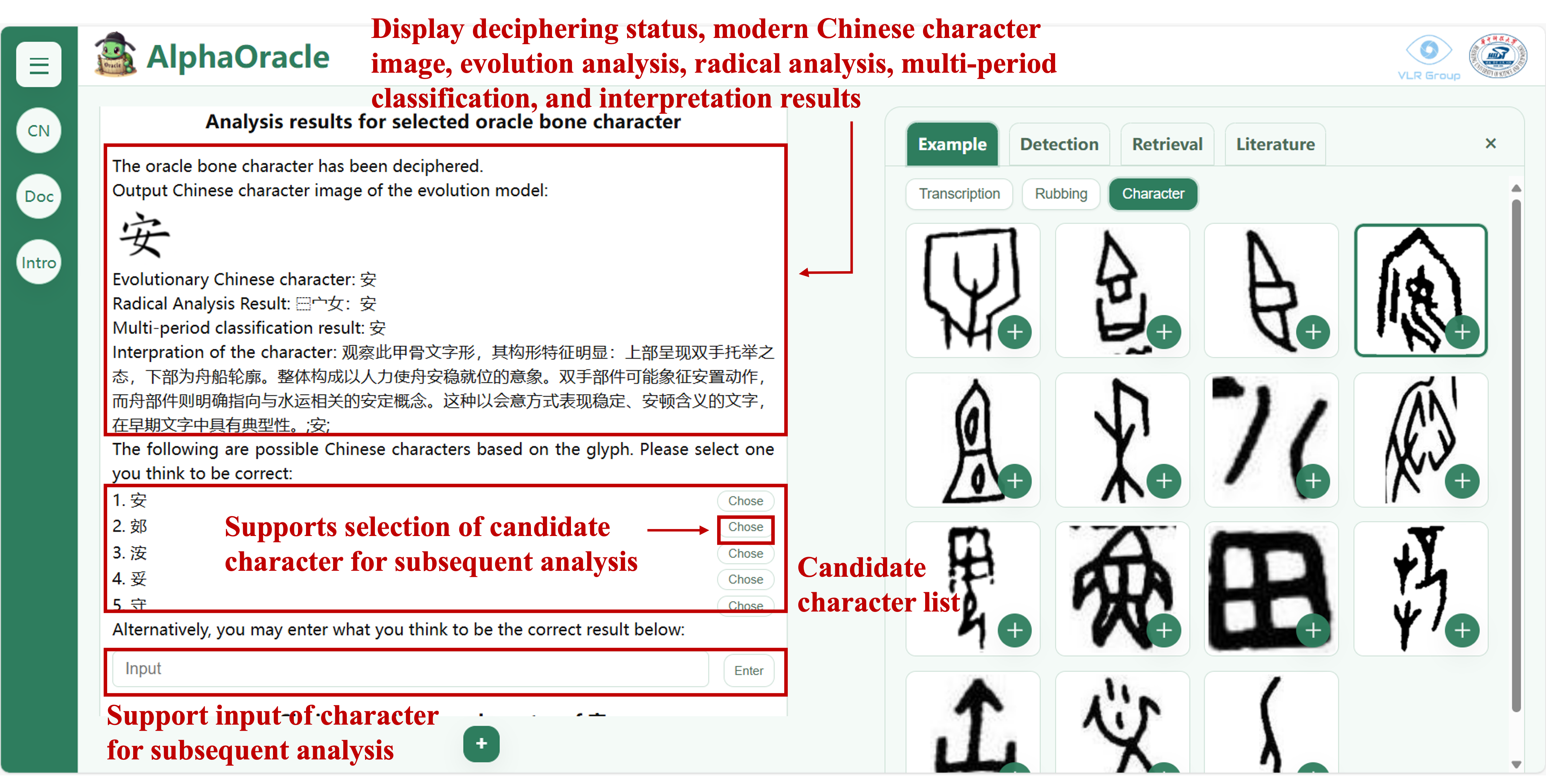
Example of single-character analysis results. The system provides multiple candidate characters, and you may also directly input other possible characters for further retrieval.
- Single-Character Analysis Results: Includes decipherment status, modern Chinese character restoration, radical structure analysis, classification across historical periods, and character form reasoning.
- Candidate and Similar Characters: Based on the analysis results, the system suggests multiple possible candidates and lists visually similar or easily confused forms for reference.
- Character Evolution Timeline: Provides a clear visual representation of the character’s evolution from Oracle Bone Script → Bronze Inscriptions → Seal Script → Regular Script.
- Multiple Candidate Selection: Choose from the candidate characters provided by the system, or input other possible characters to improve subsequent retrieval and literature search.
The dialog box will sequentially display the analysis results, candidate and similar characters, and the character evolution timeline:
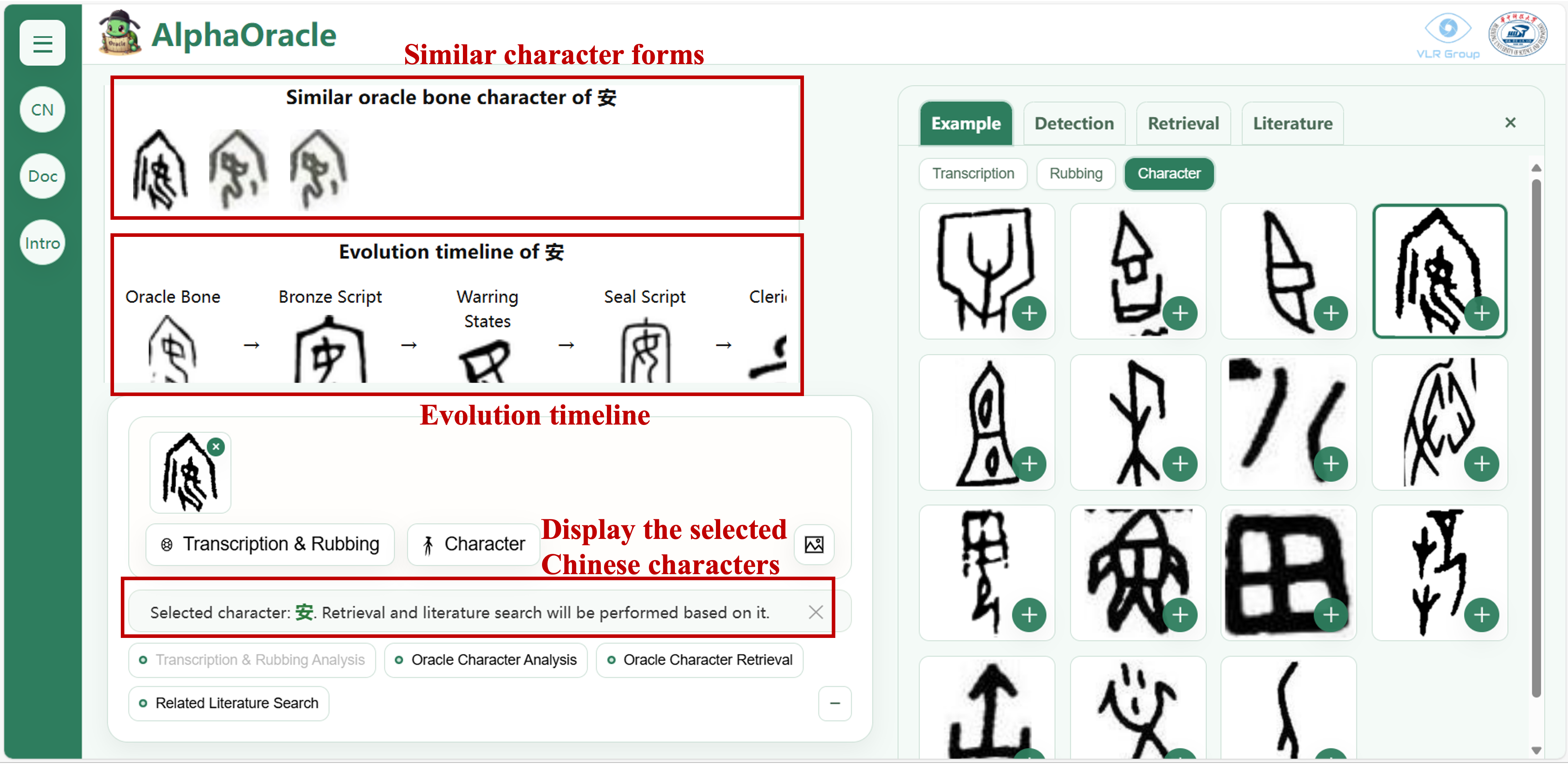
The Chinese character to be retrieved
3 Single-Character Retrieval
In-depth retrieval of single characters, locating similar forms across different rubbings
- Rubbing Provenance: Locates all rubbings and manuscripts containing similar character forms in authoritative sources such as Jiaguwen Moben Daxi and Jiaguwen Heji.
- Sentence Segment Location: Results are displayed as cards, each containing the source, ID, sentence segment, and original image, together with the corresponding annotated transcription page.
- Sentence Translation: Each sentence segment is accompanied by a modern Chinese translation. Clicking the Translate button helps you quickly grasp the meaning of the segment.
Based on the single-character analysis results, or by selecting a new oracle bone character, click the “Single-Character Retrieval” button:
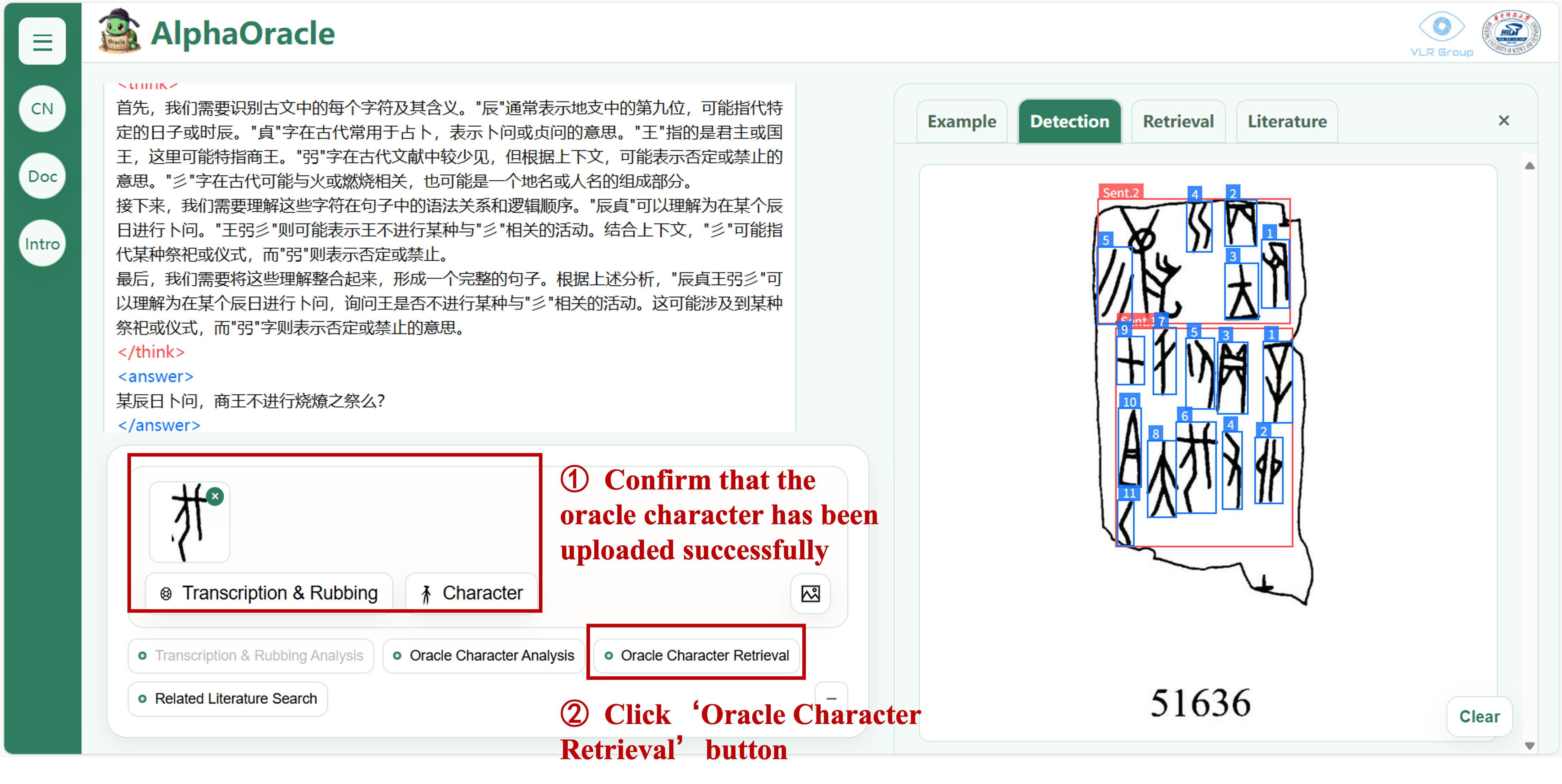
Upload a single character and perform single-character retrieval
After a short wait, the system will provide the retrieval results, presenting the corresponding sentence segments in digital form:
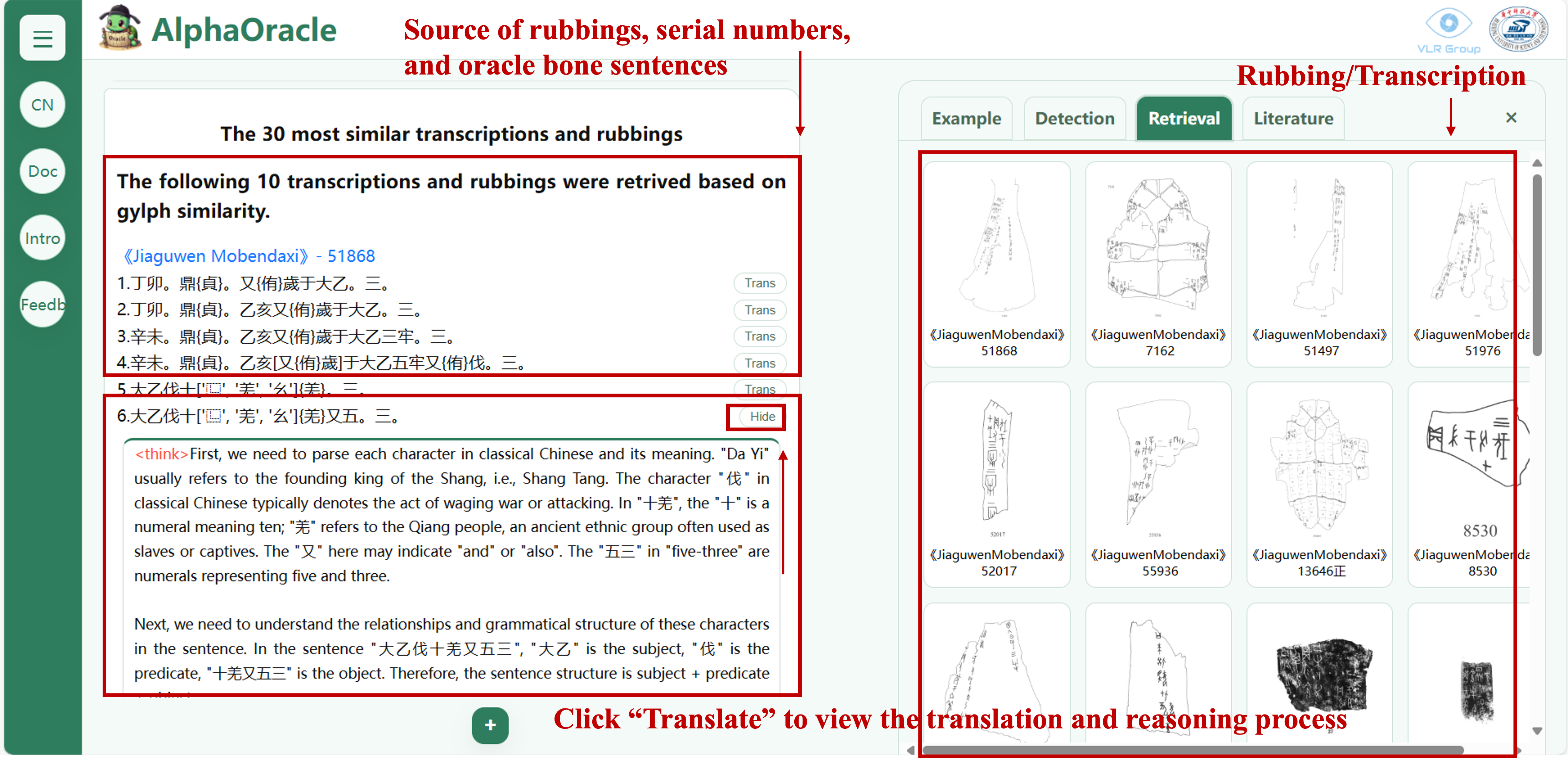
Example of single-character retrieval results
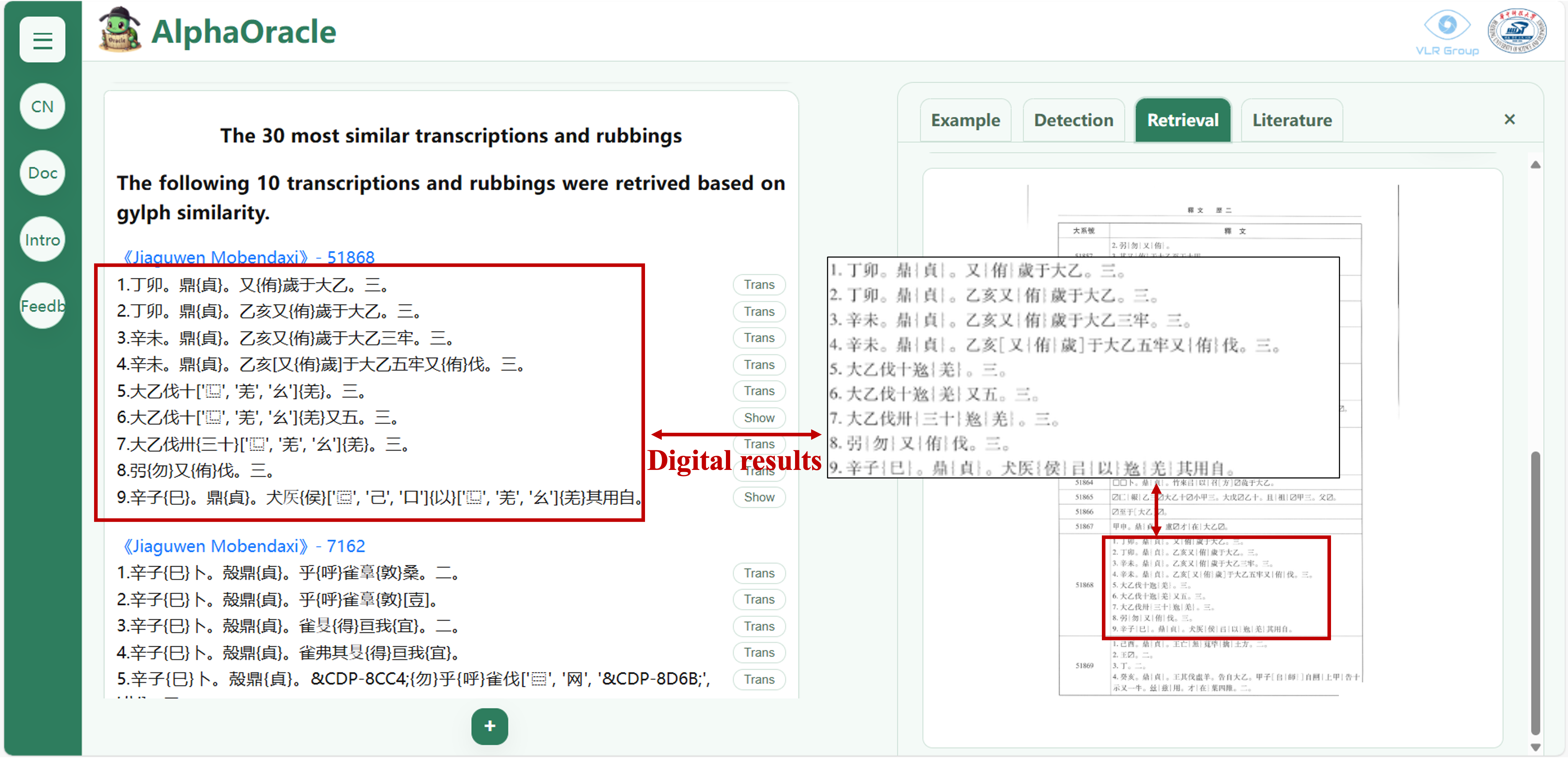
Comparison of digitalized results
At the bottom, the system summarizes the usage of the character across all retrieved sentences:
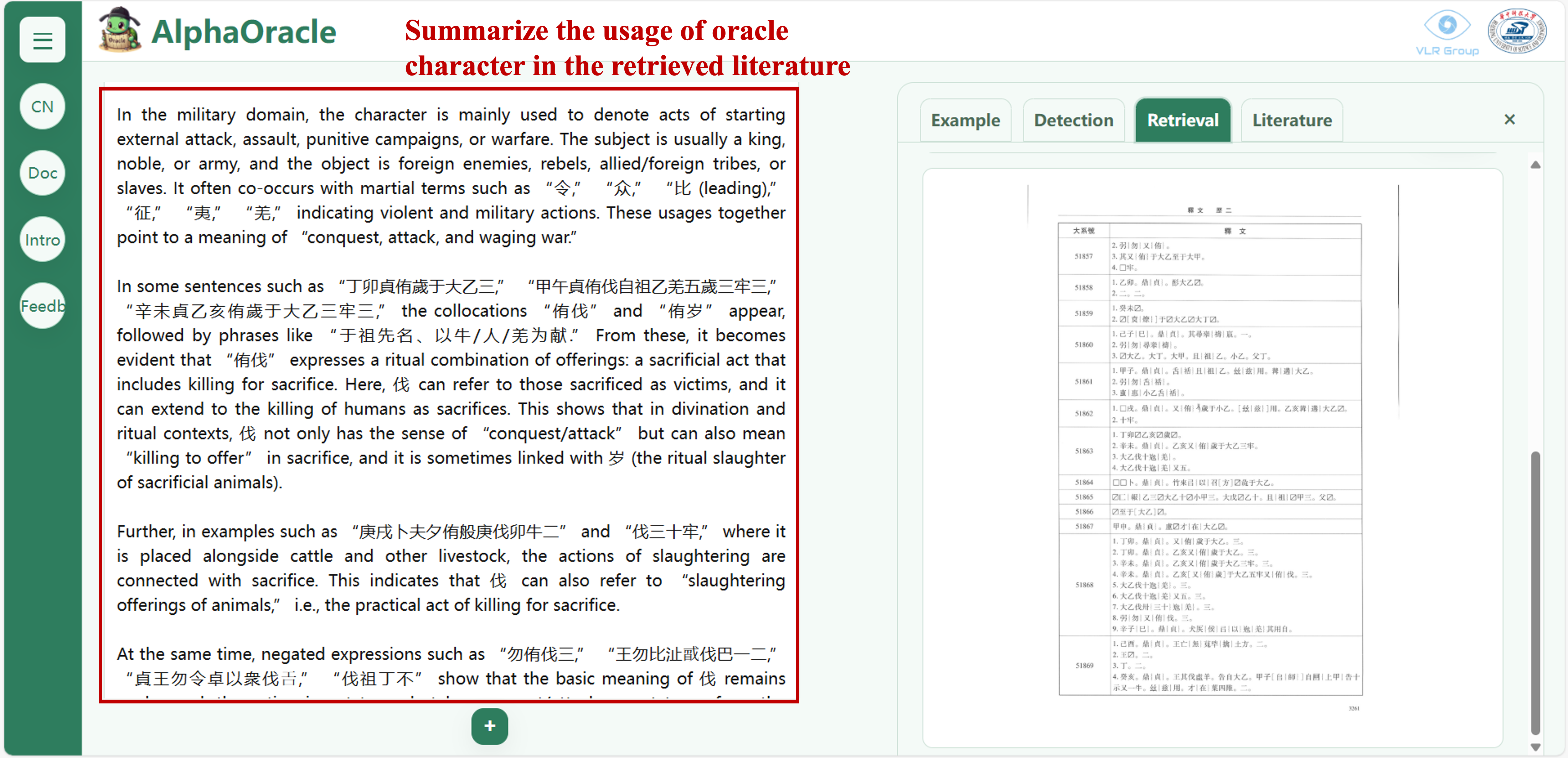
Possible meanings of the character
Click on the index results on the right to display the position of the character in the rubbing/manuscript, along with detailed interpretations of the rubbing:
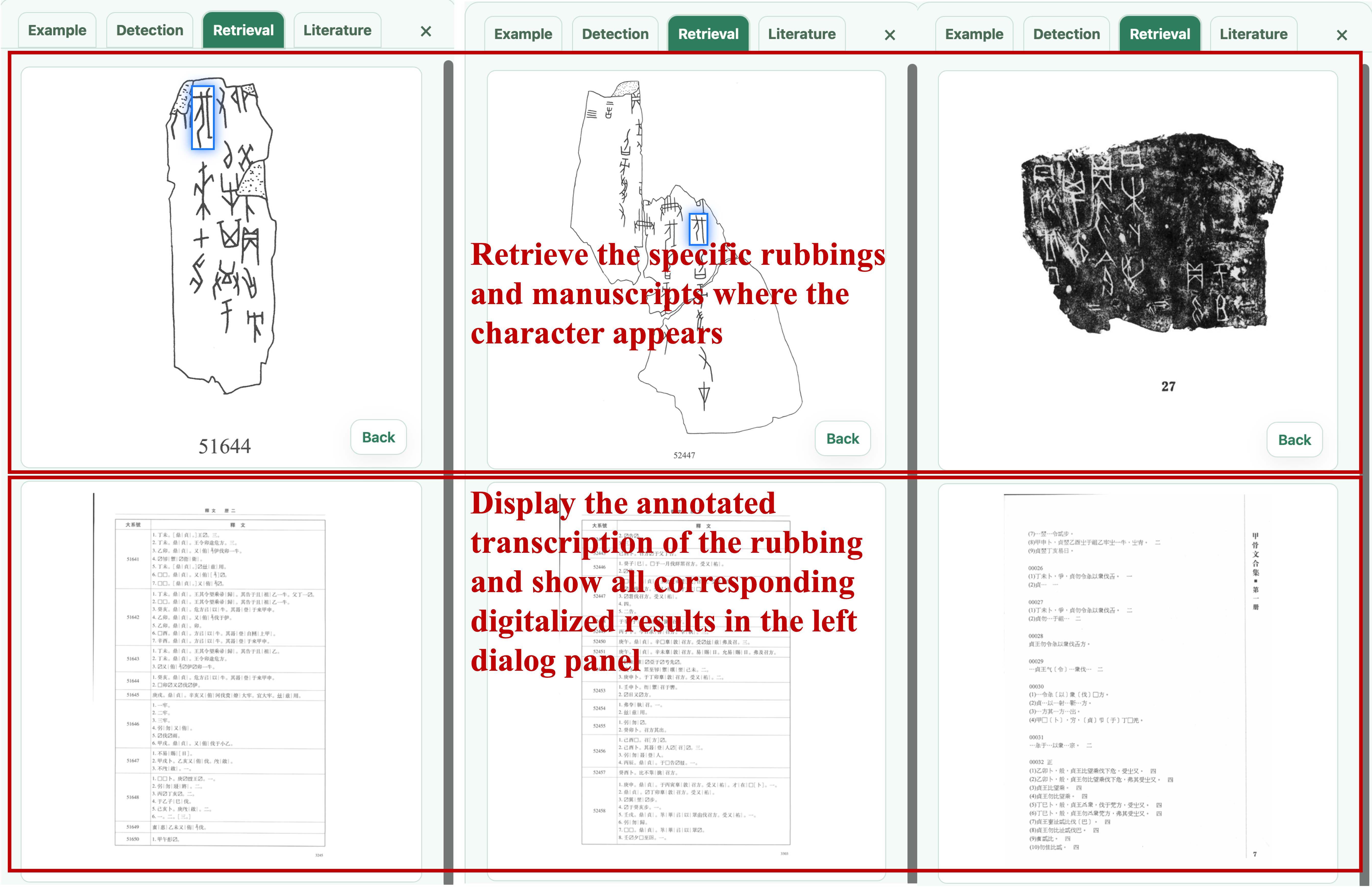
Detailed view of single-character retrieval
The dialog box will display the provenance of the rubbing, sentence segment location, and allow translation of the sentence where the character appears:
4 Oracle Bone Literature Search
Search single-character literature and match research findings from multiple knowledge sources
- Literature Search Display: Retrieve related interpretations of the character from authoritative sources such as Jiaguwen Zilin, Guwenzi Gulin, and academic papers, providing direct access to the documents.
- Contextual Positioning: The system automatically highlights the exact position of the interpretation and research results in the original text, enabling quick browsing of the context.
- Single-Character Usage Summary: The system automatically summarizes the character’s usage based on the retrieved literature.
Based on the detected single characters in rubbings or those input by the user, click the “Single-Character Literature Search” button:
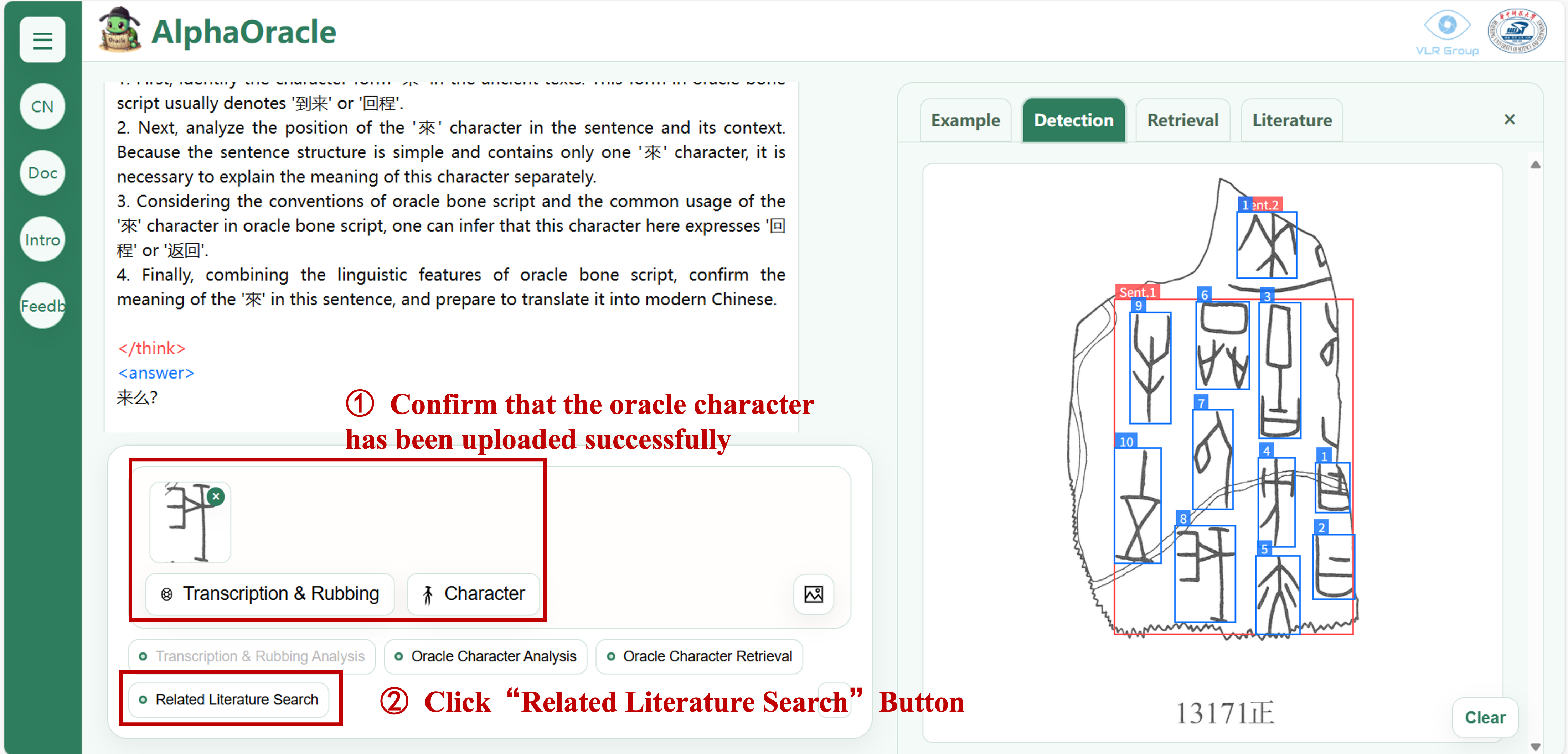
Upload a single character and perform oracle bone literature search
After a short wait, the system will provide the results of the literature search with the corresponding content:
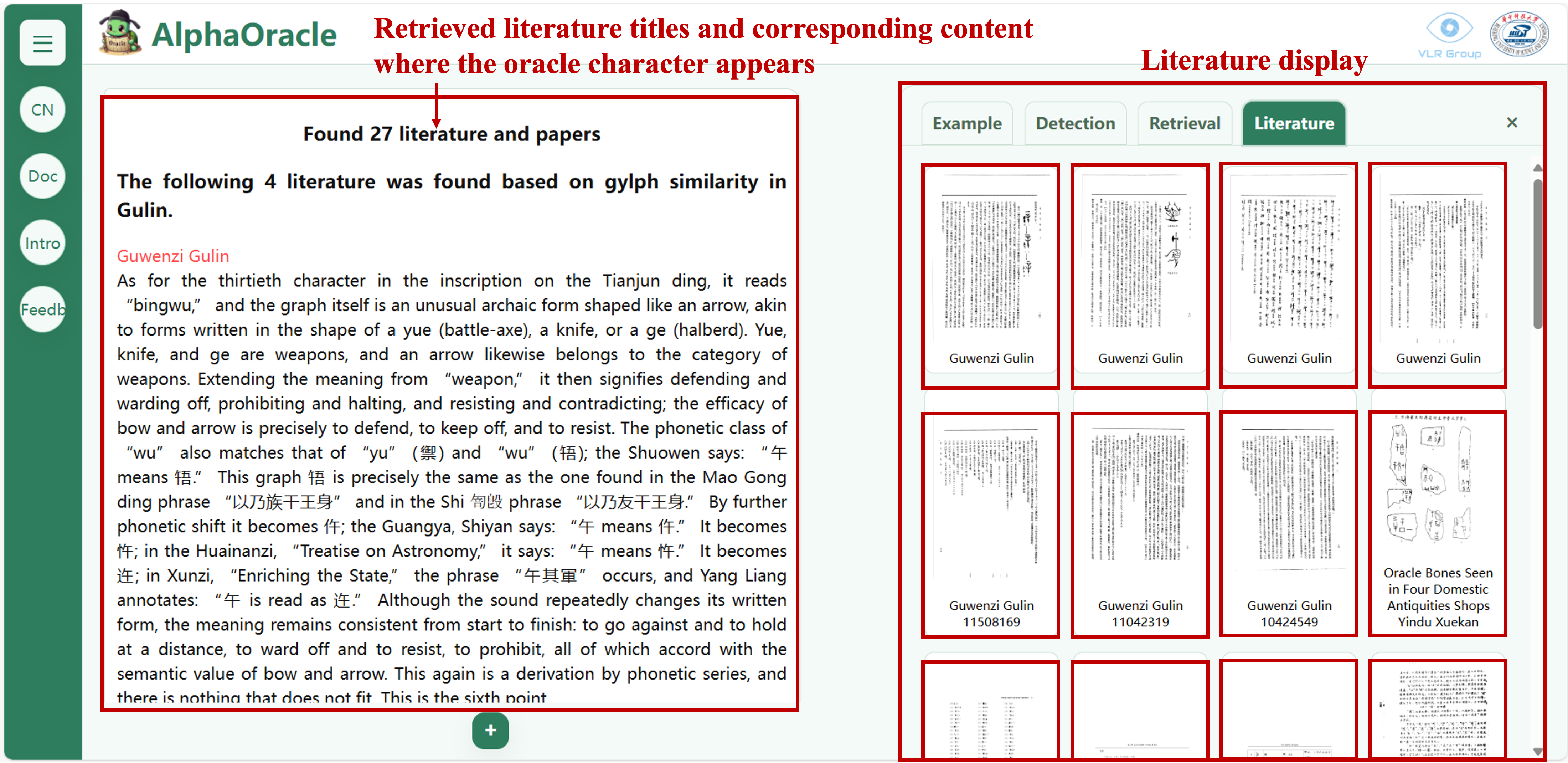
Display of single-character literature search results
Click the red literature titles on the left to locate where the oracle bone character appears in the text:
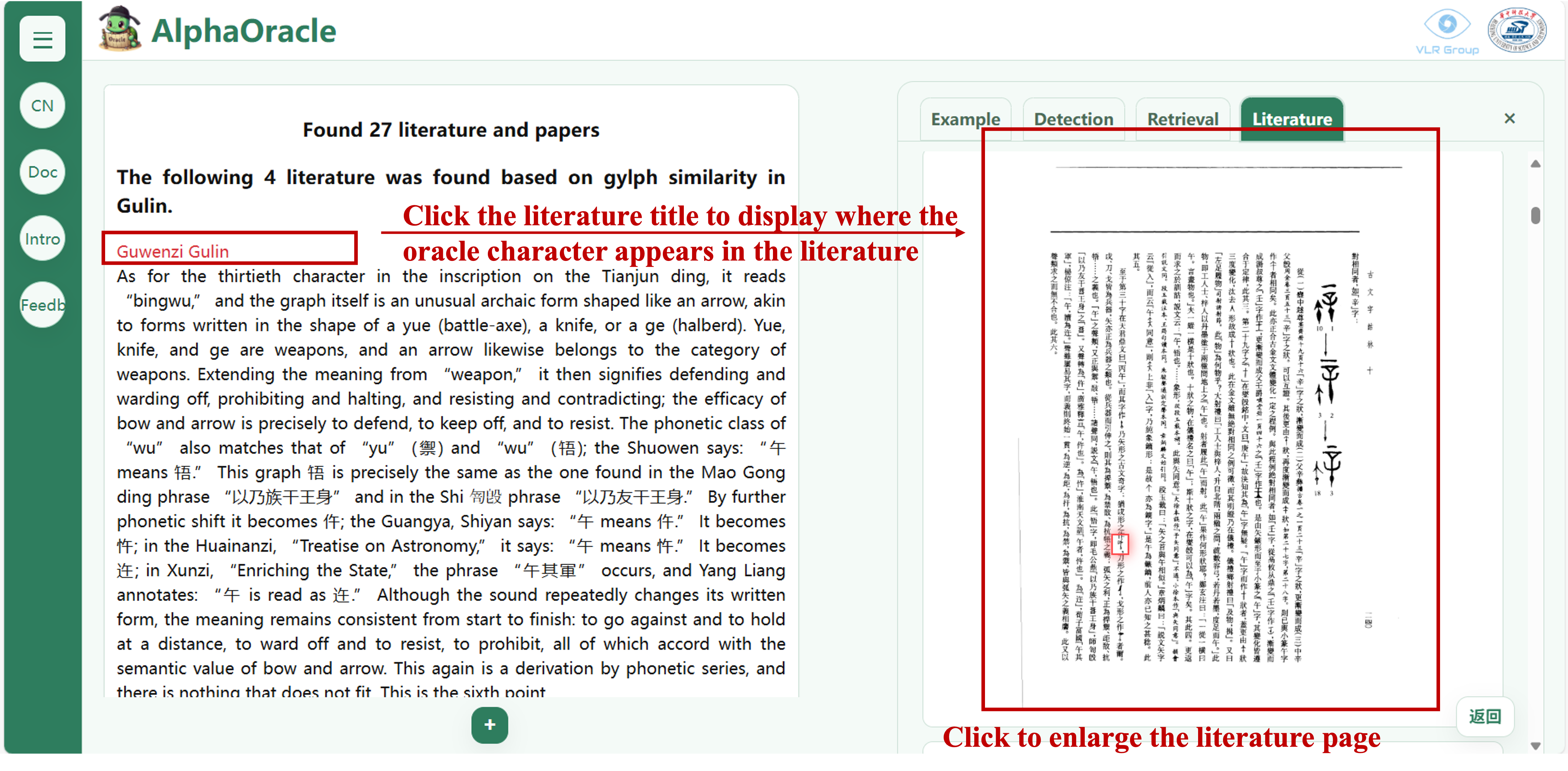
Contextual positioning of single-character search results
Click the red literature titles on the left to locate the specific content related to the oracle bone character:
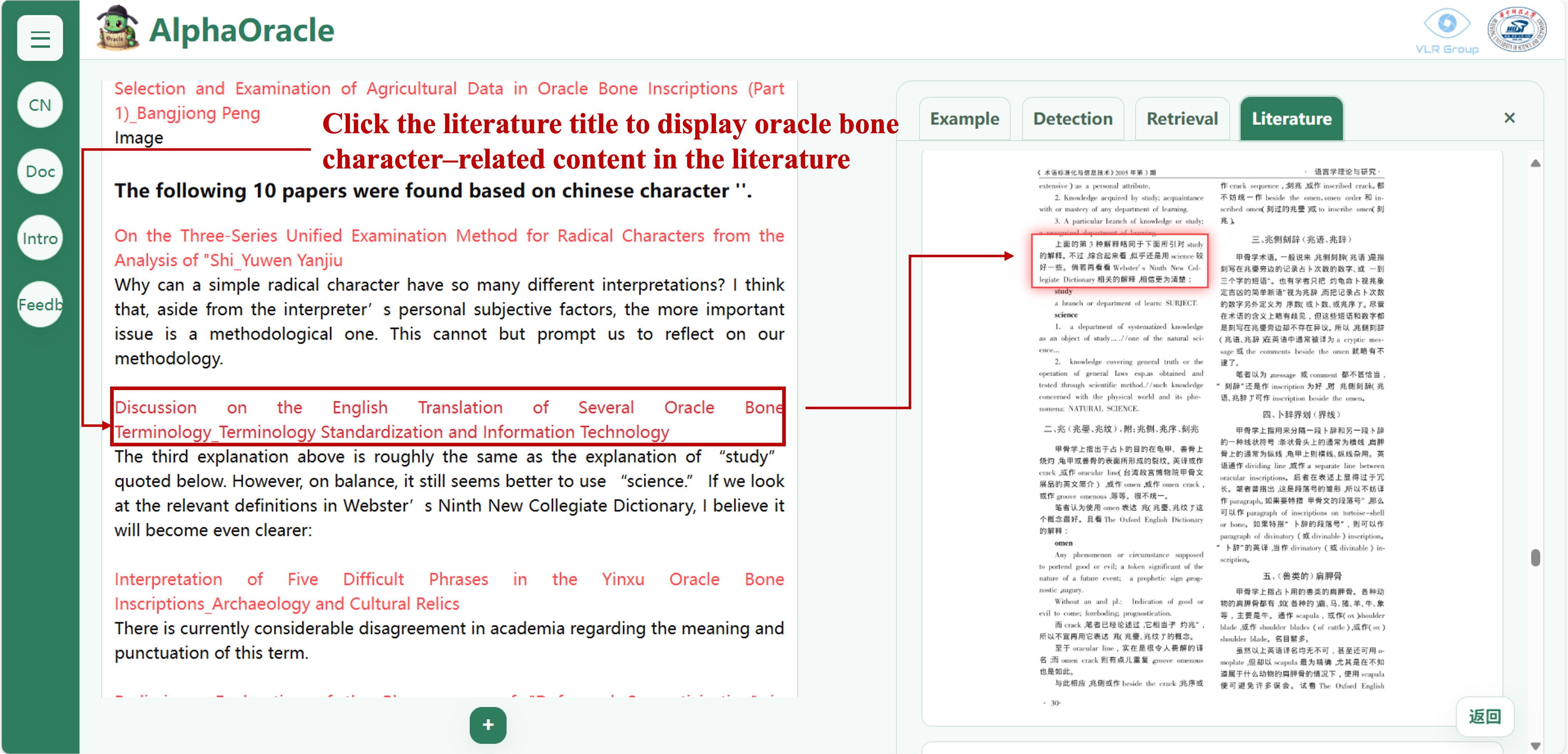
Contextual positioning of single-character search results
Summary of content related to the character:
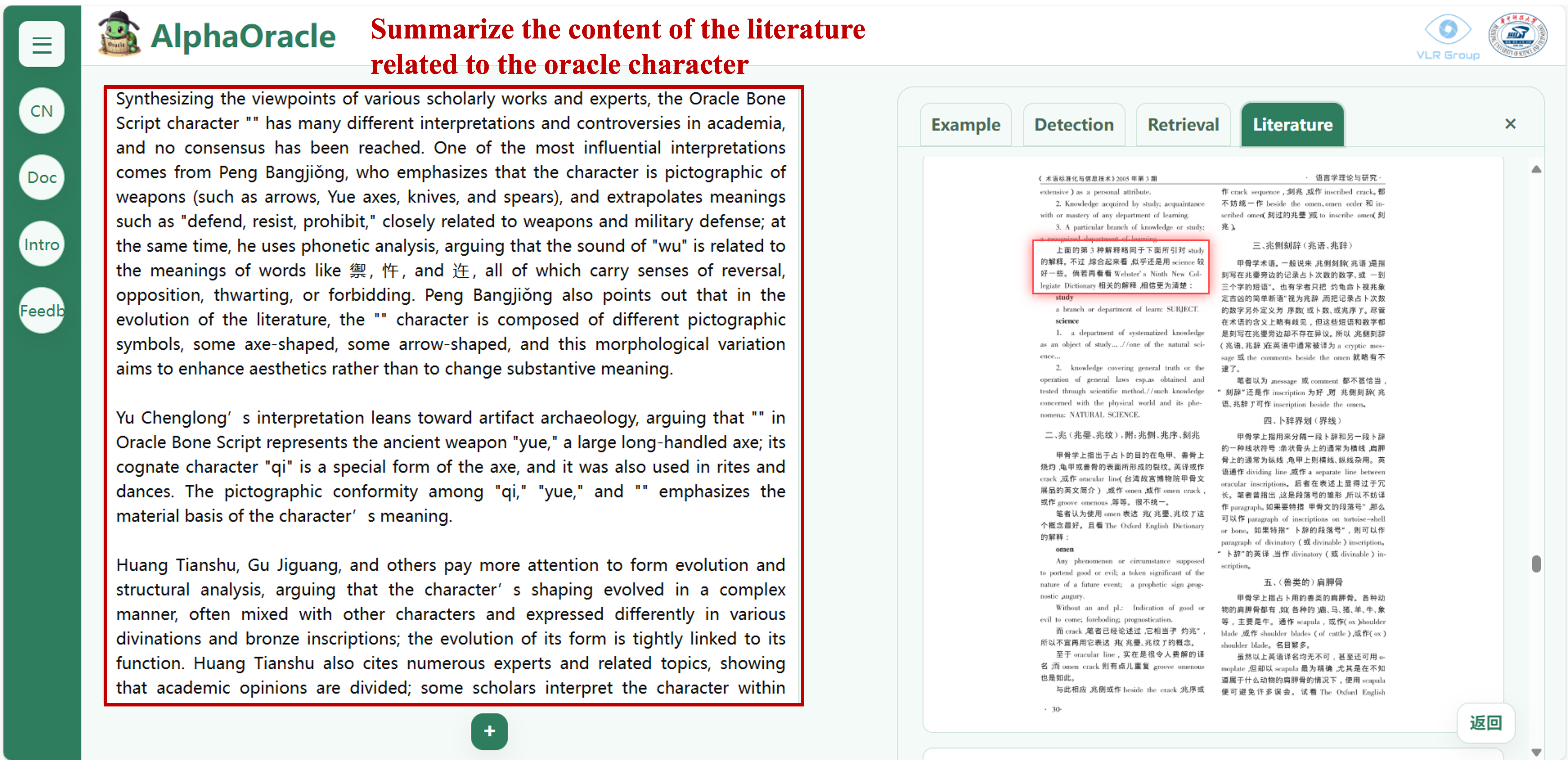
Summary of single-character usage
The dialog box will display matched explanations and research results from the knowledge base, returning a result set with image fragments and context:
💡 Tips
Suggestions for the best user experience
Usage Suggestions
- 🖼️ Image Quality: A high-resolution image with uniform lighting and minimal shadows provides the best basis for AI analysis and significantly improves recognition accuracy.
- 🖱️ Pay Attention to Buttons: Function buttons are gray by default. Make sure you have selected an image in the central workspace to activate them automatically.
- ⏳ Please Be Patient: Complex oracle bone analysis involves deep model inference. Depending on task complexity, it may take several to more than ten seconds — the results are worth the wait.
- ⚠️ Exercise Caution: The AI’s interpretations and translations are best estimates generated from large-scale data. They are valuable aids for research but should not be considered final academic conclusions. Always confirm with context and expert knowledge.
- 📩 Other Notes: The system supports four types of oracle bone image input. Due to technical limitations, not all forms may be perfectly recognized, particularly photocopied data. Users are advised to choose the input method best suited to their needs.
⚖️ Statement on Academic Rigor
Data sources and disclaimer
Core Data Sources
Our research is rooted in authoritative academic achievements, with main data sources including but not limited to:
- Jiaguwen Moben Daxi
- Jiaguwen Heji
- Jiaguwen Zilin
- Guwenzi Gulin
- Xin Jiaguwen Bian
- Multimodal Oracle Bone Dataset
- Oracle Bone Character Dataset
- Other rigorously curated academic literature databases
Disclaimer
“AlphaOracle” is committed to providing cutting-edge AI-assisted analytical capabilities. However, due to current technological and data limitations, its outputs may still contain recognition and interpretation errors. Any academic work based on this system’s outputs should explicitly acknowledge the tool as a source, with the researcher’s final judgment prevailing.
✨ User Feedback
Scan or click the QR code to access the survey page
* Please scan or click the QR code above to fill out the survey.
The world of “AlphaOracle” is now open to you — thank you very much for your feedback.
© 2025 AlphaOracle Project Team